The following is a repost from the PayPal Developer Blog by Prakhar Mehrotra, SVP of Artificial Intelligence, PayPal
At PayPal, we strive to make it easier for developers to access our services. Today, we are taking the first step to allow developers to embrace the new paradigm of agentic commerce by adopting the Model Context Protocol (MCP) and placing our services on an MCP server. This puts the power of generative AI at our merchants’ fingertips.
MCP is a standard put forward by Anthropic that is being adopted by the world’s leading AI companies to help standardize the way agents access data sources or third-party services, thereby enabling seamless integration–something that is paramount in AI-native, multi-agent systems. Starting today, developers can interact with PayPal’s official MCP server to begin enabling next-generation, AI-driven capabilities for merchants. This includes remote MCP servers available with auth integration on the cloud. With remote MCP support, users can seamlessly continue their tasks across devices with simple logins after the authentication process.
The availability of PayPal’s MCP server will enable a range of conversational AI capabilities for merchants, which we will roll out in the coming months. To illustrate the power of this new technology, we’re starting with PayPal Invoice feature, which is available today to eligible PayPal merchants.
Our First MCP Feature: Invoicing
Developers can now enable merchants who wish to utilize their preferred AI tools — including LLMs — to automatically generate invoices and shareable invoice links to send to their clients within their MCP host. This eliminates the need for merchants to visit the PayPal website or integrate using PayPal APIs for manual invoice creation, making the process of creating an invoice for a customer much faster, more intuitive, and easier to integrate into existing MCP clients.
Let’s say a PayPal merchant needs to create an invoice for a customer. Instead of creating one manually, they may decide to use an AI system that is integrated with PayPal’s MCP endpoint to create an invoice conversationally. The merchant simply should prompt the AI system with plain language, “Create a PayPal invoice link for painting a house with a cost of $450. Add 8% tax and apply 5% discount. Make sure it expires in 10 days.” With PayPal’s MCP, it will create an invoice based on this prompt, thanks to the power of AI.*
How to Get Started
There are two ways of connecting to PayPal’s MCP server:
Local PayPal MCP Server Using the Agentic Toolkit: This option enables developers to download, install, and run the PayPal MCP server locally on their own machines. It supports a wide range of MCP clients, including Claude Desktop and Cursor AI.
Remote PayPal MCP Server: This option opens the door to a broader audience — particularly users who prefer not to install local MCP servers. With remote PayPal MCP support, users have an endpoint that any MCP client can connect to seamlessly, allowing continuity of work across clients with a simple PayPal login.
Visit https://mcp.paypal.com to get started, which includes our MCP developer toolkit on GitHub, to start setting up your local PayPal MCP server or connect to the remote MCP server.
Where We Are Going
With the introduction of the MCP, PayPal is setting the foundation upon which we can build a more intelligent and responsive digital commerce ecosystem. MCP represents our commitment to continuous improvement and innovation, ensuring our developers and merchants are well-equipped to meet the evolving demands of the digital marketplace. And we’re just getting started. We’ll share more soon as we add additional products.
*Disclaimer: PayPal’s MCP server provides access to AI-generated content that may be inaccurate or incomplete. Users are responsible for independently verifying any information before relying on it. PayPal makes no guarantees regarding output accuracy and is not liable for any decisions, actions, or consequences resulting from its use.
PayPal Begins Rollout of MCP Servers to Accelerate Agentic Commerce was originally published in The PayPal Technology Blog on Medium, where people are continuing the conversation by highlighting and responding to this story.
At PayPal, hundreds of thousands of Apache Spark jobs run on an hourly basis, processing petabytes of data and requiring a high volume of resources. To handle the growth of machine learning solutions, PayPal requires scalable environments, cost awareness and constant innovation. This blog explains how Apache Spark 3 and GPUs can help enterprises potentially reduce Apache Spark’s jobs cloud costs by up to 70% for big data processing and AI applications.
Our journey will begin with a brief introduction of Spark RAPIDS — Apache Spark’s accelerator that leverages GPUs to accelerate processing via the RAPIDS libraries. We will then review PayPal’s CPU-based Spark 2 application, our upgrade to Spark 3 and its new capabilities, explore the migration of our Apache Spark application to a GPU cluster, and how we tuned Spark RAPIDS parameters. We will then discuss some challenges we encountered and the benefits of the updates.
Libra scales in the cloud, generated by AI
Background
GPUs are everywhere, and their parallelism characteristics are perfect for processing AI and graphics applications, among other things. For those unfamiliar: what makes GPUs different from CPUs, computation-wise, is that CPUs have a limited amount of very strong cores, whereas GPUs have thousands, or even tens of thousands or more, relatively weak cores that work together very well. PayPal has been leveraging GPUs to train models for some time now, and so we decided to evaluate if the parallelism of the GPU can be helpful with processing big data applications based on Apache Spark.
In our research, we encountered NVIDIA’s Spark RAPIDS open-source project. It has many purposes, however we focused on Spark RAPIDS’s cost reduction potential, because enterprises like PayPal spend lots of money on running Spark jobs in the cloud. Using Spark with GPUs isn’t common in the industry yet, but according to our findings as described in this blog, the potential benefits could be enormous.
What is Spark RAPIDS?
Spark RAPIDS is a project that enables the use of GPUs in a Spark application. NVIDIA’s team adapted Apache Spark’s design to harness the power of GPUs. It is beneficial for large joins, group by, sorts, and similar functions. Spark RAPIDS can boost the performance of certain workloads, which we’ll discuss later in the blog their identification process. You can review the documentation here for more details.
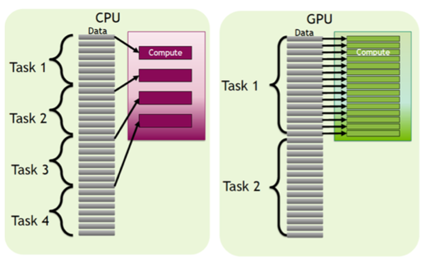
There are a few reasons to use Spark RAPIDS to accelerate big data processing with GPUs: GPUs have their own environment and programming languages, so we can’t easily run Python/Scala/Java/SQL code on them. You must translate the code to a GPU programming language, and Spark RAPIDS does this translation in a transparent way. Another cool design change that Spark RAPIDS has made is how Spark handles the tasks in each stage of the job’s Spark plan. In pure Spark, every task of a stage is sent to a single CPU core in the cluster. This means that the parallelism is at the task level. In Spark RAPIDS, the parallelism is intra-task, meaning the tasks are parallelized as well as the processing of the data within each task. The GPU is a strong computation processor, which gives us incentives to manipulate our job to be more compute-bound, hence to work with large partitions.
Task level parallelism vs data level parallelism, provided by NVIDIA
For more information and thorough explanations, we recommend reading NVIDIA’s book, Accelerating Apache Spark 3.
Getting Started
Our initial experiment with Spark RAPIDS was successful in the PayPal research environment, which is an open environment with access to the web but with limited resources and without production data. The next step was to take the accelerator to production in order to measure real production applications.
According to Spark RAPIDS documentation, not all jobs are a good fit for this accelerator, so we worked on finding the most relevant ones. We started with a Spark 2 (CPU cluster) job that handles large amounts of data (multiple of ~10TB inputs), executes SQL operations on exceptionally large datasets, uses intense shuffles, and requires a fair number of machines. The job was predicted to have high success rate based on NVIDIA’s Qualification Tool, which analyzes Spark events from CPU based Spark applications to help quantify the expected acceleration of migrating a Spark application to a GPU cluster.
As explained above, we understood that in order for the GPU to be well-leveraged, we had to manipulate our Spark job to work with large partitions. Our objective of working with large partitions is to manipulate our queries and operations to be more computation-bound, rather than I/O or network-bound, thus utilizing the GPU in an effective way.
In order to manipulate our job to work with large partitions, we changed two parameters: The AQE (Adaptive Query Execution) parameter, which is a new optimization technique in Spark 3 that, among other things, adjusts the number of partitions in a shuffle stage such that each partition will be in a certain size. The second parameter is spark.sql.files.maxPartitionBytes, which handles the input partition’s size. The number of partitions in those shuffle/input stages affects many accompanying stages as well.
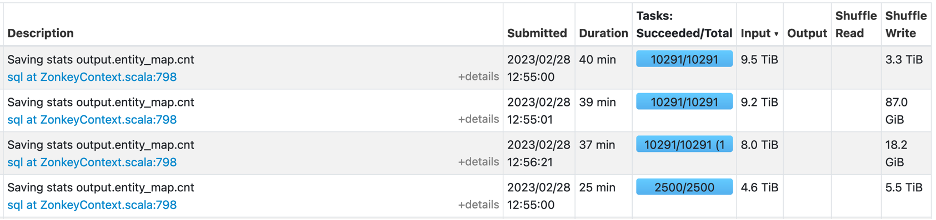
For the baseline run, we did not set the spark.sql.files.maxPartitionBytes parameter, so the Spark plan used the default value of 128MB. Now let us see how the original stage of reading the large input looks like in the Spark UI:
As you can see, we got 9.5TB of data as an input, Spark divides it into ~185,000 partitions(!) which means that every partition is around 9.5TB/185,000 = 50MB. The input files size is around 1GB, it does not make sense for us to divide each file into 20 different partitions in the Spark cluster. This separation causes many network communication overheads and results in a longer latency at this stage.
Now, after setting the spark.sql.files.maxPartitionBytes parameter to 2GB (where we manipulate Spark to read larger input partitions and thus work with larger partitions in the next stages), let us see how the stage was affected:
Our 9.5TB was distributed to 10,000 partitions, which is nearly 20 times fewer partitions than the baseline run, and it resulted in the decrease of the total time to 40 minutes, which is a 30% reduction in runtime.
Now, let us look at all the heaviest input stages of our baseline run, where spark.sql.files.maxPartitionBytes is set to default:
After setting spark.sql.files.maxPartitionBytes to 2GB:
As we can see, the change lowered the number of tasks in the input processing stages, this simple parameter change resulted in reducing the runtime of these stages by more than 20 minutes.
Spark 3 and AQE
To migrate our job to Apache Spark 3, a fair number of steps had to be taken. We had to update some syntax in our code, and each jar of our infrastructure and applications had to be compiled with an updated Scala version. You can review the official migration guide.
In Spark 3, the ability to use GPUs was added and the AQE optimization technique was enabled. As mentioned above, the goal is to manipulate Spark to work with large partitions which means applying AQE to at least 1GB (or reducing the spark.shuffle.partitions number). In order for Spark application to work with partitions of 1GB, these properties need to be configured:
As we can see below, in our use case, this kind of practice is beneficial in runtime terms:
A shuffle stage in our baseline run (no AQE):
A shuffle stage with AQE:
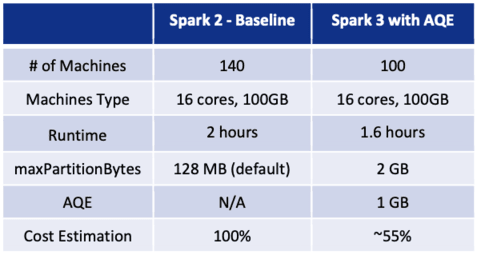
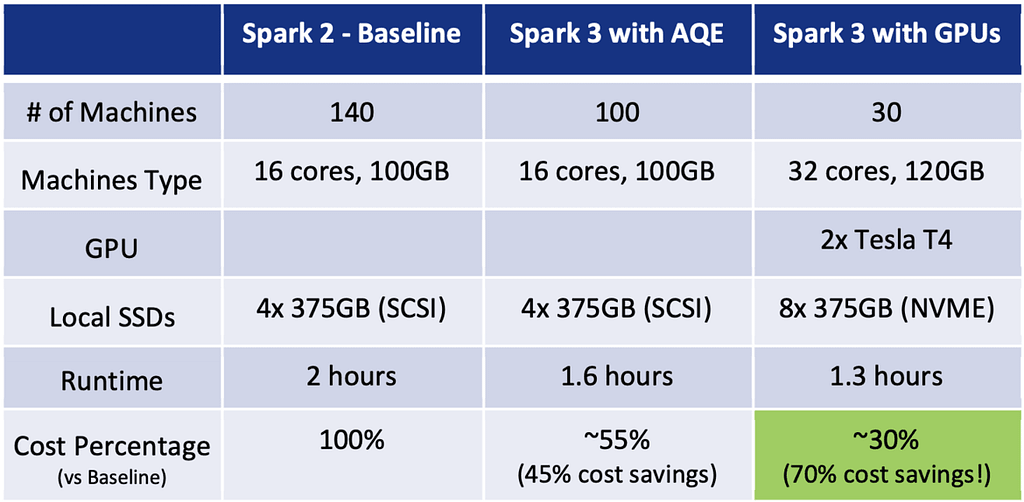
After tuning the candidate job to work with large partitions, we checked the cluster‘s utilization and saw it was not fully utilized, so we could try to reduce the amount of machines the application consumes. The baseline job is with 140 machines and after tuning Spark and the cluster nodes, we ended up with 100 machines that were fairly utilized. This change only slightly affected the runtime of the job, but dramatically reduced the cost!
The intermediate result: We cut ~20% of our application runtime and ~30% of our resources, resulting in a ~45% cost reduction!
As an example, If the initial cloud usage cost was 1,000 PYUSD, so right now we would potentially stand at around 550 PYUSD! Chart of CPU runs:
Overall, our first intention was to work with large partitions solely to benefit from the GPUs but as we can see, there is a significant performance boost even before using Spark RAPIDS, which is exciting! (Disclaimer: This practice does not bring the same results for all jobs. It depends on the data and the operations you do with it.)
So far, we just prepared our job to be suitable for Spark RAPIDS and GPUs, now the new challenges began — migrating to GPU cluster, learning new tuning concepts, troubleshooting and optimizing GPU usages.
Migration to GPU Cluster
The GPU migration included enabling the Spark RAPIDS init scripts, copying all their dependencies into PayPal’s production, supporting GPU parameters in our internal infrastructure, learning the GPU cluster features of our cloud vendor and more. (Disclaimer: These days, cloud vendors release new, custom images with a built-in instance of Spark RAPIDS, so this work can be saved.)
After running some simple jobs, making sure we created a stable and reliable infrastructure where the GPU clusters run Spark RAPIDS as expected, we deep-dived into running our candidate production application with it. Thanks to the Spark RAPIDS documentation, we triaged the few runtime errors we encountered while tuning it for our needs. Let us quickly cover two issues that helped us understand the Spark RAPIDS tuning better:
Could not allocate native memory: std::bad_alloc: RMM failure at: arena.hpp:382: Maximum pool size exceeded
The meaning behind this error is that the GPU memory pool was exhausted. To resolve this issue, some pressure is needed to be released from the GPU’s memory. After reviewing the literature, it was clear that some configurations are critical for each job. for example: spark.rapids.sql.concurrentGpuTasks — meaning the number of tasks that the GPU handles concurrently.
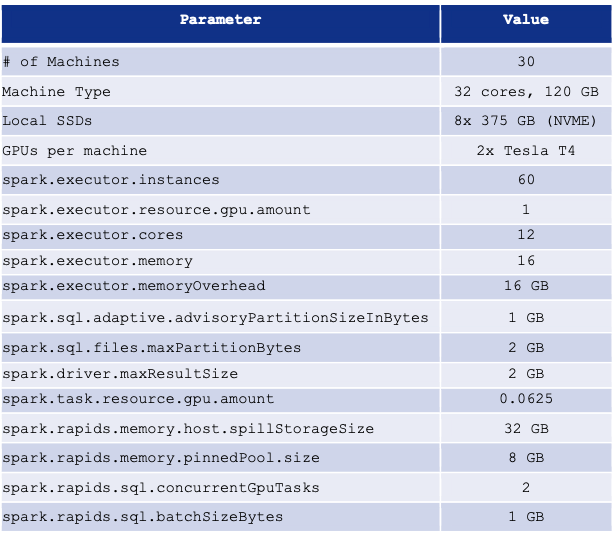
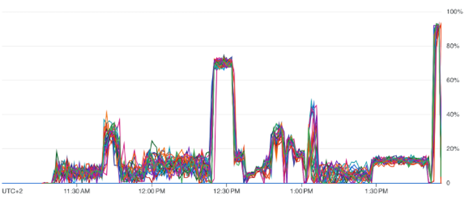
Intending to maximize the performance of our execution, we aimed to run in parallel as many tasks as possible. We were over-ambitious at first and set this parameter too high, and immediately got the above error. It happened because we use Tesla T4 GPUs, that have only 16GB of memory. As a check, we set the spark.rapids.sql.concurrentGpuTasks parameter to 1, and noticed that there are no memory errors. In order to utilize our resources properly, we had to find the sweet spot of the GPU concurrency parameter. To find that, we looked at the GPU utilization metrics, which we will explain later in the blog, and aimed the utilization to be around 50% — advised to us by NVIDIA’s team in order to have a fair division between the GPU computation and its communication/data transfer with the main memory. In our case, after some trial and error, we settled with running 2 tasks at a time, meaning setting spark.rapids.sql.concurrentGpuTasks = 2.
Another interesting issue we encountered was with runtime performance and stability. After reducing the number of machines in our cluster, from 140 to 30 machines, our Spark job was slower than expected and occasionally failed with the following prompt:
java.io.IOException: No space left on device
We looked deeper into our nodes and noticed that when we added the GPUs to the machines, we were able to solve the computation bottleneck, but the “pressure” moved to the local SSDs. This is because our GPUs with low memory capacity tend to swap memory onto local disks. The fact that our Spark plan is using large partitions adds to the disk spill. Originally, when each node had 4 SSDs (of 375GBs), we found that our job was slower than we expected, and sometimes even failed. To overcome this issue, we doubled the amount of our SSDs to 8, got stable results and better performance. Adding local SSDs is relatively cheap in cloud vendors, so this solution didn’t really affect our overall cost.
All interactions with local SSDs are much slower than main memory access. A critical parameter for this case is: spark.rapids.memory.host.spillStorageSize — the amount of off-heap host memory to use for buffering spilled GPU data before spilling to local disks.
Increasing the spill storage parameter to 32GB decreased our job’s runtime.
Spark RAPIDS Optimizations: Tips and Insights
Choosing NVIDIA’s Tesla T4 GPU: Among NVIDIA’s GPUs, we found that the Tesla T4 generally has the best performance/price ratio for this kind of computation, recommended to us by NVIDIA’s team for the purpose of cost reduction. (Disclaimer: The new L4 GPU may give better results.)
Considering memory overhead: Keep in mind that the GPU does not work with the executor’s memory, but with off-heap memory, hence we have to guarantee enough memory overhead for each executor. We set the memory overhead to 16GB.
Tuningspark.task.resource.gpu.amount: This parameter limits the number of tasks that are allowed to run concurrently on an executor, whether those tasks are using the GPU or not. At first we were greedy and tried to assign a lot of tasks to each executor. It slowed the stage’s runtime because of excessive I/O and spilling. In our case, we found that 0.0625 (1/16) was a good spot.
Usingspark.rapids.memory.pinnedPool.size: Pinned memory refers to memory pages that the OS will keep in system RAM and will not relocate or swap to disk. Using pinned memory significantly improves performance of data transfers between the GPU and host memory. We set this parameter to 8GB.
Configuring NVME Local SSDs: The disks in the Spark RAPIDS cluster were configured to use the NVME protocol, resulting in 10% speedup.
With stronger compute power, we allowed ourselves to challenge the cluster and reduce the number of machines. After some trial and error, we settled the GPU cluster to run with 30 machines of 32 cores, 120GB RAM, 8 SSDs and 2 Tesla T4 GPUs each, lasting for 1.3 hours.
Spark RAPIDS Final Tuning
GPU Utilization
Our cloud vendor provided a tool/agent that extracts metrics such as GPU utilization and GPU memory from GPU VM instances. This allowed us to monitor the usage of our GPUs, which is crucial to identify underutilized GPUs and optimize our workloads.
GPU utilization graph
Final Cost Comparison
Below we can find a summary of our research findings: As an example, consider a job that costs 1,000 PYUSD, Spark 3 with GPUs reduces that cost to 300 PYUSD. Depending on the configuration, you can enjoy potential cost savings of up to 70% for processing large amounts of data using GPU Clusters.
The price of the machine’s hardware is factored into the cost calculation
Key Learnings
GPUs can be effectively leveraged not only for training AI models, but for big data processing as well.
Spark jobs that consume large amounts of data to perform certain SQL operations on large datasets are good candidates to be accelerated with Spark RAPIDS. Their eligibility can be validated with NVIDIA’s Qualification Tool.
Certain workloads benefit from being compute-bound, which can be achieved by manipulating the Spark job to work with large partitions, via spark.sql.files.maxPartitionBytes and the AQE parameters.
Leveraging Spark 3 with GPUs and Spark RAPIDS can significantly reduce your cloud costs for eligible workloads.
Thoughts for the Future
The potential of running Spark RAPIDS with an autoscaling GPU cluster is highly regarded by us. This practice may significantly reduce the costs of major GPU machines due to their lower spot prices compared to permanent instances.
Acknowledgments
Thanks to the significant contributions of Lena Polyak, Neta Golan, Roee Bashary, and Tomer Pinchasi for the project’s success. Thanks so much to NVIDIA’s Spark RAPIDS team for supporting us.
By Jun Yang, Zhenyin Yang, and Srinivasan Manoharan, based on the AI/ML modernization journey taken by the PayPal Cosmos.AI Platform team in the past three years.
Source: Dall-E 3
AI is a transformative technology that PayPal has been investing in as a company for over a decade. Across the enterprise, we leverage AI/ML responsibly to address a wide range of use cases — from fraud detection; improving operational efficiencies; providing personalized service and offers to customers; meeting regulatory obligations, and many more things.
To accelerate PayPal’s innovation and deliver incredible value to our customers through technology, we are working to put the innovative power of artificial intelligence into the hands of more employees across different disciplines and accelerate time-to-market for building and deploying AI/ML powered applications, in service of our customers and in alignment with our Responsible AI principles. The blog below details a key internal platform that is helping us do this: PayPal Cosmos.AI Platform.
AI/ML Platform: The Enterprise Approach Over the years, many engineering systems and tools have been developed to facilitate this practice at PayPal, addressing various needs and demands individually as they emerged. Several years ago, as we began to expand AI/ML across all core business domains, it became increasingly evident that the prevailing approach of having a collection of bespoke tools, often built and operated in their own silos, would not meet the needs for large scale AI/ML adoptions across the enterprise.
Conceived around 2020, PayPal Cosmos.AI Platform aims at providing end-to-end Machine Learning Development Lifecycle (MLDLC) needs across the enterprise by modernizing and scaling AI/ML development, deployment and operation, with streamlined end-to-end Machine Learning operations (MLOps) capabilities and experiences, making it faster, easier, and more cost effective to enable businesses through AI/ML solutions.
Since its official GA in mid-2022, Cosmos.AI has been gradually adopted by business domains across the company and became the de-facto AI/ML platform for the enterprise. Every day, thousands of data scientists, analysts, and developers hop to Cosmos.AI Workbench (Notebooks) and other research environments to develop machine learning and other data science solutions. In production, hundreds of deployed ML models serve tens of billions of inferencing requests, real-time and batch, on-premises and in the cloud on daily basis, supporting a wide range of business needs across the company.
In this blog, we provide a comprehensive view of the PayPal Cosmos.AI platform, starting retrospectively with the conscious decisions made at its conception, the rationales behind them, followed by an overview of its high-level architecture and a more detailed breakdown of its major components with their respective functionality through the lens of end-to-end MLOps. We then showcase how we have enabled Generative AI (Gen AI) application development on the platform, before concluding the blog with future works on the platform.
The Guiding Principles When we first started conceiving what an enterprise-level AI/ML platform could be for the company, we took our time to establish a set of guiding principles based on our on-the-ground experiences gained from many years of practices of MLDLC. These principles remain steadfast to this day.
Responsible AI PayPal remains committed to using AI technology in a responsible manner, consistent with legal and regulatory requirements and guidance and our overall risk management framework. Our approach to AI use is guided by our five core Responsible AI principles and our Responsible AI Steering Committee, consisting of cross-functional representatives who oversee AI development, deployment, governance, and monitoring.
PayPal Cosmos.AI reflects our commitment to Responsible AI in a number of ways, including minimizing inherited undesirable biases through data governance processes and training data management, enhancing interpretability through explainable AI, ensuring reproducibility with simulation, and having human-in-the-loop reviews whenever necessary.
Streamlined end-to-end MLDLC on one unified platform The concept of a platform as a one-stop shop covering the entire MLDLC was pioneered by AWS SageMaker and later adopted by all major public cloud providers such as Azure Machine Learning and GCP Vertex AI. We believe this approach inherently provides the advantages of a consistent, coherent, and connected set of capabilities and user experiences compared to the ‘bespoke tools’ approach where tools are created independently, driven by ad hoc demands. The latter can lead to proliferation of overlapping or duplicative capabilities, resulting in frustrating confusing user experiences and high maintenance costs.
Cosmos.AI aims to provide streamlined user experiences supporting all phase of MLDLC, including data wrangling, feature engineering, training data management, model training, tuning and evaluation, model testing & CICD, model deployment & serving, explainability and drift detection, model integration with domain products, as well as other cross-cutting MLOps concerns such as system and analytical logging, monitoring & alerting, workflow automation, security and governance, workspace & resource management, all in one unified platform, catered for PayPal’s specific context and scenarios for MLDLC.
Best-of-breed with abstraction & extensibility The AI/ML industry evolves extremely fast with new technologies emerging almost daily, and quantum leaps happen every now and then (just think about the debut of ChatGPT). How do we ensure the platform we build can stay current with the industry?
On Cosmos.AI, we decoupled platform capabilities from their actual embodiments. For example, distributed training as a capability can be implemented using an in-house built framework on Spark clusters on-premise, and as Vertex AI custom training jobs leveraging GCP. This best-of-breed approach with abstraction allows us to independently evolve components of our platform to leverage the most optimal technologies or solutions at each phase of MLDLC, be it in-house built, opensource adopted, or vendor provided. Abstractions have also been created among major components of the platform, for example, the Model Repo API ensures the compatibility of Model Repo with its upstream process (model development) and downstream process (model deployment), regardless of the underneath technology solution we choose for the component (e.g. MLFlow).
This approach lends itself well to greater extensibility of the platform. As shown in a later section, we were able to build a Gen AI horizontal platform on top of Cosmos.AI rather quickly, by extending capabilities in several phase of the MLDLC catered for Large Languages Models (LLM), including LLM fine-tuning, adapter hosting, LLM deployment, etc. and other LLMOps functionality.
In addition, this approach also mitigates potential vendor and/or technology lock-in, making the platform more future-proof given the constant changes of technology landscape and company policies.
Multi-tenancy from ground up Multi-tenancy is essential to enterprise platforms such as Cosmos.AI. It creates the necessary boundaries among different scrum/working teams, so that they have the maximum autonomy over the projects or use cases they own, without being overloaded with information they don’t need, as we observed in the previous generation of tools. It also enables guardrails for fine-grained access control and permission management, so teams can work safely and at their own pace without stepping on each other’s toes, and maintain data protections.
Multi-tenancy is a prerequisite for self-service, another key principle embraced by the PayPal Cosmos.AI platform as discussed next.
Self-service with governance We observed that when it comes to productionizing ML solutions developed by data scientists, dedicated engineering support is often needed to handle the operational aspects of the lifecycle. This poses a constraint for scaling AI/ML across the enterprise.
We firmly believe that the ability of self-service is key to the success of PayPal Cosmos.AI as an enterprise AI/ML platform, and we adhere to this principle throughout the platform from its foundational constructs, to user experiences, as we will discuss in later sections.
Seamless integration with enterprise ecosystems At this point one might ask why we chose to build Cosmos.AI platform instead of adopting a vendor solution such as SageMaker or Vertex AI as is. For one, as we recognized through our evaluations, one-size-fits-all cookie cutter solutions did not, and most likely will not, meet all the functional requirements from a wide spectrum of use cases in a large enterprise — some of which are highly proprietary and advanced, and customizations can only go so far. In addition, requests for new features or enhancements to external vendors are highly unpredictable.
But the more fundamental challenges are the mandates for this platform to seamlessly integrate with the company’s ecosystems and policies, such as data security, data governance and other regulatory compliances for fintech companies like PayPal. From engineering perspectives, the platform needs to be an integral part of existing companywide ecosystems and infrastructures, such as centralized auth & auth and credential management, role-based permission management, data center operations, change process, central logging, monitoring and alerting, and so on.
Multi-cloud and hybrid-cloud support PayPal encompasses a multitude of business domains and adjacencies, each of which may require the deployment of applications and systems in diverse environments. Recognizing this intricate landscape, Cosmos.AI is designed to be both multi-cloud and hybrid cloud, ensuring robust support across these varied environments.
There are many factors to consider when we productionize customer use cases on Cosmos.AI, including:
Data affinity: customer solutions need to be deployed close to their data sources as much as possible to avoid data movements and security risks.
Application affinity: customer application dependencies, downstream and upstream, on-Prem or cloud.
SLA: fulfill requirements on latency, throughput, availability, disaster recovery (DR), etc.
Cost: deploy workloads of different natures in the right environment for optimal cost-effectiveness. For example, research workloads requiring repetitive on-and-off, trial-and-error attempts may be more economically done on-Prem, while productionized workloads can leverage the scalability and elasticity provided by cloud more efficiently.
The coverage provided by Cosmos.AI over various environments allows us to productionize customer use cases with the right balance among these factors.
The Foundations We developed various constructs and frameworks within PayPal Cosmos.AI that are fundamental to the platform. Leveraging these foundational elements, we successfully constructed the Cosmos.AI platform, aligning with the guiding principles set forth.
Project-based experience A fundamental construct within the Cosmos.AI platform is the AI Project. It serves as the cornerstone for enabling multi-tenancy, access control, resource management, cost tracking, and streamlining the end-to-end MLDLC process.
From a user interface and user experience (UIUX) perspective, it empowers users to operate within their dedicated workspaces, with role-based access controls seamlessly integrated with PayPal’s IAM system. Beneath each AI Project, resources are managed in isolation, encompassing storage, compute, and data. Artifacts imported and produced during the MLDLC journey, such as training datasets, experiments, models, endpoints, deployments, monitoring, and more, are all contained within their respective AI Projects. This design fosters genuine multi-tenancy and facilitates self-service. Project owners and members can independently work within their projects, including deployment, without concern for interfering with others (subject to predefined platform-level governance within Cosmos.AI). This approach enhances the scalability of ML solution development while reducing time to market.
Dynamic resource allocation and management We built a framework capable of dynamically allocating and managing computing resources on Cosmos.AI for model deployment and serving. At its core is a sophisticated Kubernetes CRD (Custom Resources Definition) and Operator that creates model deployments, including advanced deployments as discusses later, as well as manages the orchestration, scaling, networking, tracing and logging, of pods and model services. This is a pivotal capability on Cosmos.AI platform, enabling self-service MLOps to productionize ML solutions with ease. Coupled with multi-tenancy and governance, this allows domain teams to develop, experiment, and go production with their ML solutions at their own pace, all within their allocated resource quota and proper governance policies set forth by the platform. This paradigm offers MLDLC at scale and greatly shortens their time-to-market (TTM).
Workflow automation with pipelines Workflow automation is another framework foundational to the Cosmos.AI platform. It consists of several parts: an experience for users to compose pipelines using building blocks provided by the platform, such as data access, processing and movement, training, inferencing, or any custom logic loaded from container Artifactory. Resulted pipelines can be scheduled, or triggered by another system — for example, a detection of model drift by monitoring system can automatically trigger model refresh pipeline — training data generation, model training, evaluation, and deployment.
User experiences through UI, API & SDK Cosmos.AI created user experiences for customers across the entire spectrum of ML expertise, exposed mainly through two channels: the Cosmos.AI Hub, a web-based application with intuitive, interactive and coherent UI guides users of different levels going through all phases of MLDLC, leveraging advanced techniques such as drag-and-drop visual composers for pipelines and inferencing graphs, for example. For advanced uses preferring programatical access to the platform, they can choose to work on Cosmos.AI Workbench, a custom user experience built on top of Jupyter Notebook with accesses to platform capabilities through Cosmos.AI API & SDK, in addition to the UI. Cosmos.AI Hub and Workbench play critical roles in delivering the user experiences enabling streamlined, end-to-end MLDLC with self-service.
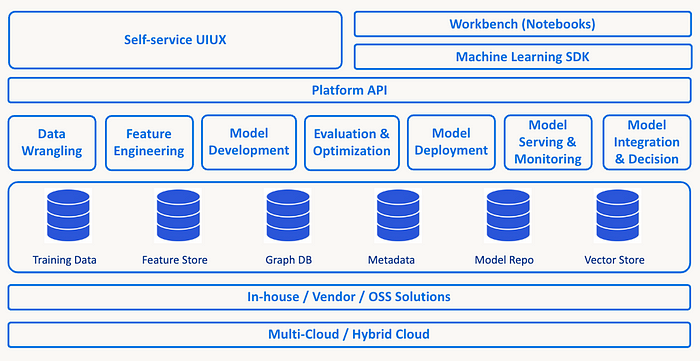
The Architecture The diagram below provides a high-level layered view of PayPal Cosmos.AI platform architecture.
The MLOps Focus PayPal Cosmos.AI has been built with a strong focus on MLOps, particularly on the model development, deployment, serving and integration with business flows. In this section, we delve into the next level details on key components in Cosmos.AI that makes it stand out from a MLOps perspective.
Model development: training dataset management, training & tuning For any model development lifecycle, dataset management is a critical part of the lifecycle. PayPal Cosmos.AI supports preparation of training datasets integration with feature store and manage these datasets along with sanity checks and key metrics while seamlessly integrating with training frameworks and experiment tracking. Along with training datasets, it also helps manage and keep a system of record for other datasets crucial for advanced features like explainer, evaluation, drift detection and batch inferencing cases.
Cosmos.AI provides a very rich set of open source and proprietary model training frameworks like TensorFlow, PyTorch , Hugging Face, DGL, and so on, supporting many deep learning algorithms and graph training algorithms. It also provides a very easy way to run these massive training jobs locally or in distributed manner with use cases datasets in the scale of 200 million samples with 1,500 features in various modes like map reduce, Spark and Kubernetes, abstracting the underlying infrastructure and complexity from the data scientists and helping them to effortlessly switch with mere configuration changes. It also provides various templates of commonly used advanced deep learning modules like Logistic regression, DNN, Wide & Deep, Deep FM, DCN, PNN, NFM, AFM, xDeepFM, networks & training algorithms supporting a variety fraud, personalization, recommendations and NLP use cases. Cosmos.AI also provides seamless integration into cloud provider offerings for model training with ease and high security standards.
Model repo: experiment & model registry Cosmos.AI provides an advanced and comprehensive framework for capturing all aspects of the model training process, emphasizing reproducibility, traceability, and the meticulous linking of training and evaluation datasets to the model. This encompasses the inclusion of training code, hyperparameters, and configuration details, along with the thorough recording of all model performance metrics. The platform facilitates seamless collaboration among data scientists by allowing them to share their experiments with team members, enabling others to reproduce identical experiments.
In addition to robust experiment tracking, the model repository stands as a pivotal component within the platform. It houses the physical artifacts of the model and incorporates essential metadata required for inferencing. Crucially, every model is intricately linked to its corresponding experiment, ensuring a comprehensive lineage for all critical entities throughout the entire machine learning lifecycle.
Model Deployment Cosmos.AI supports several model deployments approaches catered for PayPal’s hybrid cloud environments. However, our discussion is confined to the predominant Kubernetes-based approach, with the expectation that other methods will gradually phase out and converge towards this mainstream approach in the near future.
At the core of the model deployment component is a custom-built Deployment CRD (Custom Resource Definition) and Deployment Operator on Kubernetes. They work together to allocate resources like CPU, GPU, memory, storage, ingress etc. from underlying infrastructure and create a DAG (Directed Acyclic Graph) based deployment with orchestrations among models, pre/post processors, logger & tracer, or any containerized custom logics (e.g. Gen AI components as discussed in a later section) based on the deployment specification generated by Cosmos.AI from user inputs through the deployment workflow.
This is an extremely powerful capability on Cosmos.AI platform, enabling simple and advanced model deployment schemes such as Inferencing Graph, Canary, Shadow, A/B testing, MAB testing, and so on. It is a key enabler for self-service, as technically a user can just pick one or more registered models from the model repo, specify a few parameters, and have a model endpoint running ready to service inferencing requests in a few clicks — all through a guided, UI based flow by herself.
However, in reality, it is necessary to build governance and security measures into the process. For example, we integrated with company-wide change process so that every action is trackable, and with operation command center to observe site wide events such as moratorium.
Model inferencing Model inferencing capabilities on Cosmos.AI fall into two categories: batch and real-time.
Cosmos.AI offers batch inferencing on two infrastructure flavors: Spark native and Kubernetes, available both on-premises and cloud environments. These solutions are highly scalable and cost efficient, making them extensively utilized in use cases like offline model score generation, feature engineering, model simulation and evaluation, and so on. Typically, these processes are integrated as steps within workflows managed by workflow management services such as the Cosmos.AI pipeline.
Real-time inferencing on Cosmos.AI is implemented through various technology stacks, supporting all combinations of model aspects in the company: Java and Python runtime; PayPal proprietary and industry standard; conventional ML, Deep Learning, and LLM. On our mainstream Kubernetes based platform, we support complex DAG based model inferencing, GPU optimization such as GPU fragmentation, and multi-GPU for LLM serving, adaptive / predictive batching and other advanced model serving techniques.
Model integration: rule lifecycle, domain product integration Rarely are model scores used in isolation to make decisions and drive business flows at PayPal. Instead, a Strategy Layer, typically comprised of rules — often numbering in the hundreds for a specific flow — is positioned on top. This layer synthesizes other ingredients at runtime, incorporating additional context or factors, with business rules applied as deemed necessary by the domain.
Cosmos.AI built a complete Decision Platform to support this need. At the core of its runtime is an in-house built lightweight Rule Engine capable of executing rules based on a Domain Specific Language (DSL), with end-to-end dependencies expressed as a DAG. User Defined Functions (UDF) as platform provided, built-once-use-many capabilities can be invoked anywhere in the execution flow. In design time, an interactive UI with drag-n-drop is used for developers to author rules with self-service and minimum coding. In addition, integrations with upstream domain products are facilitated by a UI based use case onboarding and API schema specification workflow. The entire rule lifecycle and use case management including authoring, testing, regression, deployment and monitoring are supported through the platform.
Explainability and drift detection Explainability is supported on Cosmos.AI mainly through black-box models. Depending on the types, frameworks and input data formats of the models, a variety of algorithms, e.g., Tree SHAP, Integrated Gradients, Kernel SHAP, Anchors etc. are utilized to provide instance-specific explanations for predictions. We also built explainability into our end-to-end user experience where users can train explainers or surrogate models as well as main models, before deploying them together through a single deployment workflow.
Model drift detection is also supported on Cosmos.AI through monitoring and alerting of model metrics such as Population Stability Index (PSI) and KL Divergence. Integrated with automated model re-training pipeline on the platform, drift detection is used as an alerting and triggering mechanism to guard against model concept drifts in production.
Gen AI Enablement Since Generative AI (Gen AI) has taken the world by storm with the groundbreaking debut of ChatGPT in late 2022, we embraced this transformative technology early on, by exploring, evaluating and onboarding various Gen AI technologies, particularly those centered around Large Language Models (LLM), anticipating a fresh wave of widespread Gen AI adoptions potentially reshaping every facet of customer experiences and applications throughout the company and the industry.
Thanks to the solid foundations we have in place for platform with its remarkable extensibility, we were able to develop a Gen AI horizontal platform on PayPal Cosmos.AI in the span of a few months, allowing PayPal to fully tap into this technology and rapidly scale Gen AI application development across the company, while reducing costs by minimizing duplicated efforts on Gen AI adoptions among different teams.
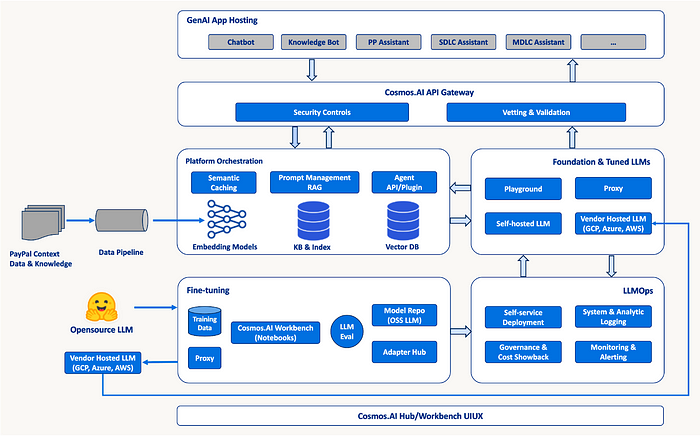
Below is an overview of the Gen AI capabilities we built on Cosmos.AI platform:
We augmented our training platforms allowing users to fine-tune opensource LLMs through custom Notebook kernels with PEFT frameworks such as LoRA/QLoRA integrated, and enabled fine-tuning of vendor hosted LLMs through API with security measures such as Data Loss Prevention (DLP) in place. We extend our model repo to effortlessly onboard opensource LLMs from public model gardens such as Hugging Face, with legal and licensing checks in the process. We also extend the model repo to host LLM Adapters as outputs from fine-tuning processes, deployable with their coupling foundation models.
The needs for LLMOps are accommodated nicely by extending existing MLOps capabilities on Cosmos.AI, including the ability to deploy LLMs with high parameter sizes across multiple GPU cards; LLM optimizations (including quantization) leveraging cutting edge frameworks and solutions for better resource utilization and higher throughput; streaming inferencing optimized for multi-step, chatbot-like applications; logging/monitoring to include more context such as prompts which are specific to LLM serving. Cost and showback for budgeting purposes are supported out-of-the-box through AI Projects on Cosmos.AI. Of course, we also developed a suite of new capabilities and infrastructure components to enable Gen AI as a transformative technology on our platform, including:
Adopted a purposely built Vector DB from a leading opensource solution as the foundation for embedding and semantic based computations.
A Retrieval-Augmented Generation (RAG) framework leveraging Vector DB (for indexing & retrieval) and Cosmos.AI pipelines (for context and knowledge ingestions), enabling a whole category of chatbot and knowledge bot use cases across the enterprise.
Semantic Caching for LLM inferencing, also built on top of Vector DB, to cut down operational costs for vendor and self-hosted LLM endpoints and reduce inferencing latency at the same time.
A Prompt Management framework to facilitate prompt engineering needs of our users, including template management, hinting, and evaluation.
Platform Orchestration framework: the advent of Gen AI introduced a distinct need for complex orchestrations among components and workflows. For example, to enable in-context learning and minimize hallucination, a LLM inferencing flow may involve prompt management, embedding generation, context/knowledge retrieval, similarity-based search, semantic caching, and so on. The industry has come up with some popular frameworks such as LangChain, LlamaIndex aiming at streamlining such workflows, and Cosmos.AI has built an orchestration framework with in-house developed capabilities and opensource packages as a platform capability.
LLM Evaluation supporting major industry benchmarking tools and metrics, as well as enabling custom PayPal internal datasets for domain / use case specific evaluations.
Gen AI Application Hosting to bootstrap client applications on Cosmos.AI platform.
Utilizing the Gen AI horizontal platform as a foundation, we have enabled an ecosystem of internal agents for cosmos specializing in code, internal knowledge, model document creation and other MLDLC tasks using multi-agent and orchestration framework. This enables us to enhance productivity and efficiency for our data scientists and ML engineers by offering a Gen AI-powered experience on the Cosmos platform.
An architecture overview of Gen AI horizontal platform on Cosmos.AI is shown below:
Future Work As we advance further on the journey of modernizing AI/ML at PayPal that commenced three years ago, we are currently envisioning the future landscape three years from today. Here are some initial considerations.
Evolve from an AI/ML platform into an expansive ecosystem tailored for enterprise use, including datasets, features, models, rules, agents and APIs as core competencies.
Transition from self-service/manual processes to autonomous workflows in SDLC/MDLC/Front Office/Back Office Operations, incorporating automation and leveraging multi-agent framework driven by Generative AI.
Delve further into the realm of AI and incorporate elements such as data provenance, lineage, explainability, feedback loop, RLHF, and more, moving beyond the confines of AI/ML to AGI.